Virtual Drive Thru / e-Transfer orders
e-Transfer orders, matched for you.
Your customers pay by Interac e-Transfer like they already do. You stop scrolling your inbox to work out who paid for what.
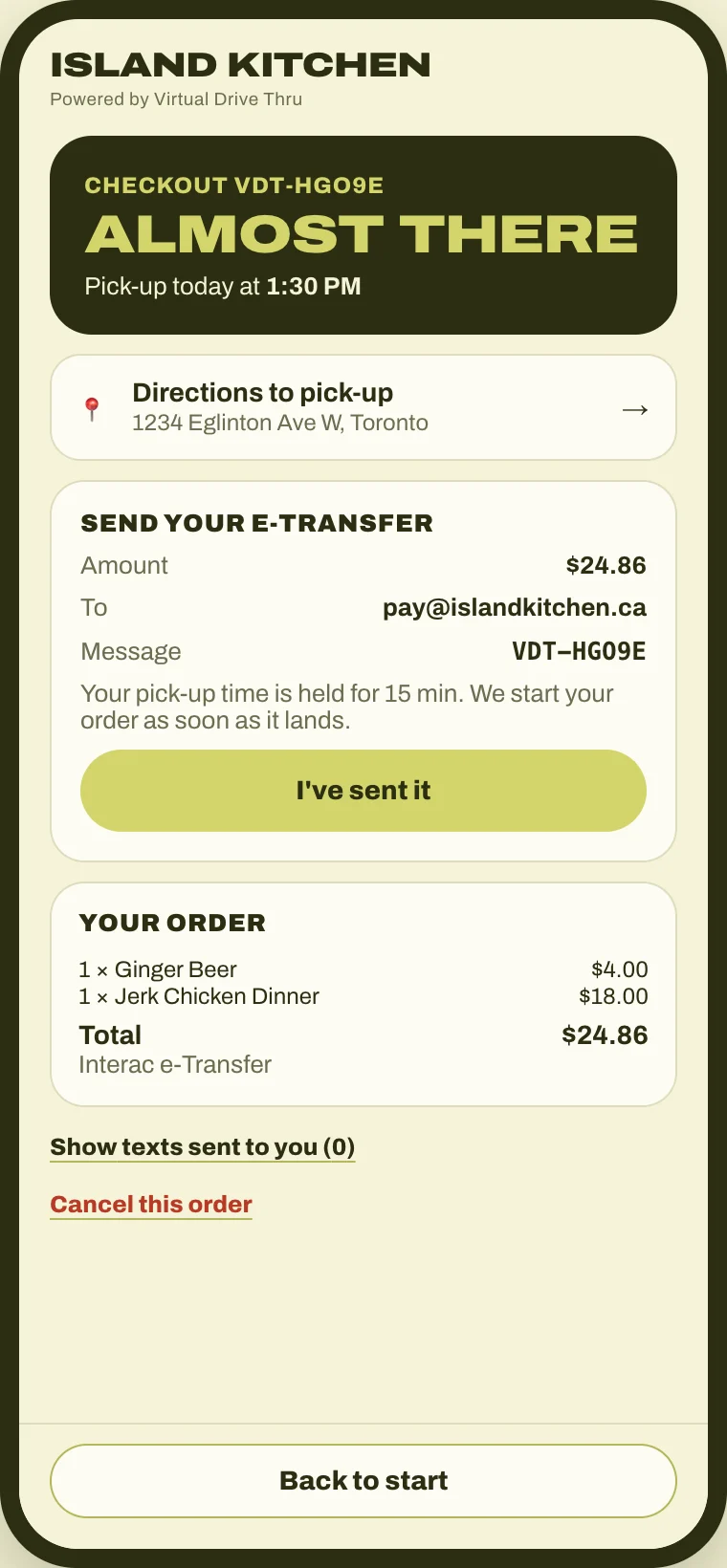
The customer sees exactly what to send
At checkout they get the amount, your e-Transfer email and a short code to put in the message. Their pick-up time is held while they send it.
Your bank's notice comes to us
You forward your e-Transfer notices to your private Virtual Drive Thru address. You set this up once.
We check it's real
Each notice is checked to make sure it really came from the e-Transfer system, not from someone pretending.
We match it to the order
The code, the amount and the timing have to line up. Then the order is marked paid and goes to your kitchen screen.
Anything odd comes to you
No code, the wrong amount or a stranger's payment lands in your review list, never straight in the kitchen.
Questions about e-Transfers
Do you need my bank login or my email password?
No. You set up a forwarding rule in your email so only your bank's e-Transfer notices come to your private Virtual Drive Thru address. We never see your bank login, and we can't read the rest of your inbox.
What if a customer forgets the code?
The payment goes to your review list with the amount and the sender's name. You match it to the order with one tap.
What if they send the wrong amount?
Too little and the order waits in your review list. Too much and the order shows what you owe back, so nothing gets missed.
Can someone fake a payment with a screenshot?
No. A screenshot never marks an order paid. Only a real notice from the e-Transfer system, with the right code and amount, does.